Thermal Paste for CPU: Mounting Matters More Than Brand

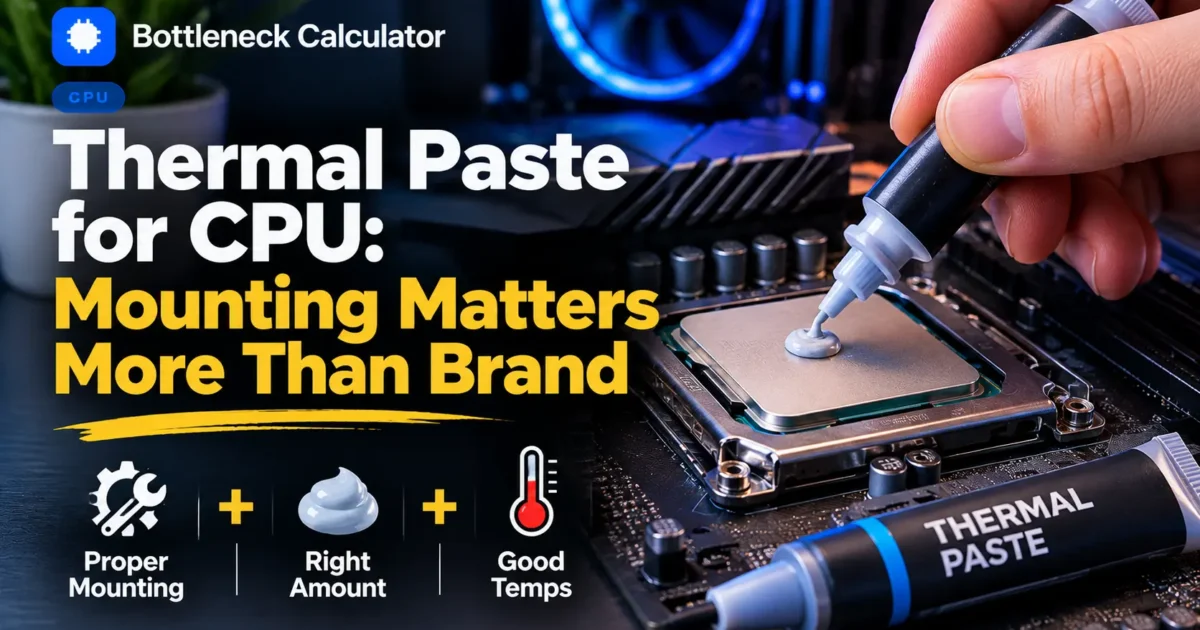
CPU thermal paste is the cheapest component in your machine and the one most likely to be applied wrongly, re-applied unnecessarily, or blamed for problems it did not cause.
People spend forty minutes reading comparisons between pastes that differ by two degrees, then mount the cooler slightly loose and lose fifteen.
Here is the honest ranking of what actually matters. Mounting pressure first, by a wide margin. Then paste age. Then quantity. The specific brand of paste is somewhere near the bottom, worth perhaps two to four degrees between a decent one and a premium one.
Which means the time to spend is on fitting the cooler properly, not on choosing between tubes.
This guide covers how to apply it, when it genuinely needs replacing, and which paste types are worth the money.
You will finish knowing how to apply thermal paste correctly, how often it actually needs changing, and how much difference the paste itself makes compared with everything else.
I cover application methods, paste types and when each makes sense, replacement intervals, how much temperature a change really returns, and the mistakes that cost far more than paste choice.
My position. Buy a reputable mid priced paste, apply a pea sized blob in the centre, mount the cooler evenly, and never think about it again for five years. The optimisation beyond that is not worth your evening.
What this skips: liquid metal, delidding and direct die contact. Prices reflect September 2026.
What is the best thermal paste for a CPU?
The best processor paste is any reputable ceramic or carbon compound from a known cooling brand, which performs within two to four degrees of the best available. Spend 8 to 15 dollars on a well reviewed tube, which will cover several applications, and put your effort into mounting rather than selection.
| Paste type | Typical price | Performance | Best for |
|---|---|---|---|
| Budget ceramic | $4 to $8 | Baseline | Office machines, light use |
| Mid range ceramic or carbon | $8 to $15 | 2 to 4C better | Almost everyone |
| Premium carbon | $15 to $25 | 1 to 2C better again | Enthusiasts, marginal gain |
| Thermal pads | $10 to $20 | 2 to 5C worse | Reusable, very convenient |
| Liquid metal | $15 to $25 | 5 to 10C better | Experienced users only, conductive |
Liquid metal is genuinely better and genuinely risky. It conducts electricity, so a spill onto the board can end the machine. I would not recommend it for a first build.
How do you apply thermal paste?
Put a pea sized blob in the centre of the heat spreader and let the cooler spread it under pressure. Do not spread it manually, do not use too much, and tighten the cooler screws in a diagonal pattern a few turns at a time to keep pressure even.
- Clean the old paste off with isopropyl alcohol and a lint free cloth.
- Let both surfaces dry completely.
- Apply a pea sized blob in the centre.
- Lower the cooler straight down without sliding it.
- Tighten screws diagonally, two turns each, until snug.
Step five is where most of the real performance lives. Uneven pressure costs far more than any paste difference.
How much thermal paste should you use?
A pea sized amount for a standard processor, slightly more for a large one. Too little leaves gaps that trap air, and too much acts as insulation while risking spill onto the socket. The cooler spreads it under pressure, so manual spreading is unnecessary.
Err slightly on the generous side rather than the sparse side. Excess squeezes out harmlessly in most cases while a dry patch does real damage to temperatures.
The X pattern and five dot methods both work fine too. The differences between application methods are smaller than the differences between pastes, which is to say very small.
How often should you replace thermal paste?
Every three to five years in a normal machine, or whenever you remove the cooler for any reason. Paste dries out slowly and loses contact efficiency, which shows up as temperatures creeping higher over years rather than as a sudden failure.
On a machine that has run five years without attention, fresh paste commonly returns five to fifteen degrees. That is a genuine improvement for a few dollars.
Replacing it annually is unnecessary and risks more damage from repeated cooler removal than it prevents.
How much does fresh paste actually lower temperatures?
On old dried paste, five to fifteen degrees. On paste that is two years old and fine, perhaps one or two. Swapping a decent paste for a premium one returns two to four degrees at most, which is within the variance you would see from ambient room temperature alone.
Set your expectations by the age of what is currently fitted rather than by the brand you are buying.
Measure before and after properly if you want to know. Our guide on monitoring processor temperature covers the ten minute test that gives a real comparison.
Do you need paste with a new cooler?
Usually not, since most coolers ship with paste pre-applied or included in the box. Pre-applied paste from a reputable cooling brand performs perfectly well, and removing it to apply your own gains you essentially nothing.
Use what comes with the cooler on a first install. Buy a tube for the next time you remove it.
Check the cooler specification before ordering paste separately, since you may not need it at all.
Does thermal paste matter more on X3D chips?
Slightly, because stacked cache chips already have extra thermal resistance between the cores and the heat spreader. Good contact matters more when the heat path is already compromised, though the paste itself still only accounts for a few degrees.
Mounting pressure matters more here than on a standard chip, so take extra care tightening evenly.
Our guide on cooling a 9800X3D covers why these chips read warmer than their wattage suggests.
What mistakes do people make with thermal paste?
They obsess over brand while mounting the cooler unevenly, they use far too much, and they replace it annually when every three to five years is plenty. Mounting pressure accounts for more temperature difference than every paste comparison combined.
The second most common error is not cleaning the old paste off properly. Residue prevents proper contact and wastes the whole exercise.
If your temperatures are genuinely high, check dust and cooler mount before reaching for paste. Our guide on fixing a processor bottleneck covers the order those checks should follow.
Frequently asked questions
What is the best thermal paste for a CPU?
Any reputable ceramic or carbon paste from a known cooling brand performs within two to four degrees of the best available. Spend 8 to 15 dollars on a well reviewed tube and put your effort into mounting the cooler evenly instead.
How do you apply thermal paste correctly?
Put a pea sized blob in the centre of the heat spreader and let the cooler spread it under pressure. Do not spread it manually, and tighten the cooler screws diagonally a couple of turns at a time to keep pressure even.
How much thermal paste should I use?
A pea sized amount for a standard processor and slightly more for a large one. Too little traps air gaps and too much acts as insulation. The cooler spreads it under pressure, so manual spreading is unnecessary.
How often should thermal paste be replaced?
Every three to five years in a normal machine, or whenever you remove the cooler. Paste dries slowly and loses efficiency, which shows as temperatures creeping up over years rather than failing suddenly.
How much does new thermal paste lower temperatures?
On old dried paste, five to fifteen degrees. On two year old paste that is still fine, perhaps one or two. Swapping a decent paste for a premium one returns two to four degrees at most.
Do I need thermal paste with a new cooler?
Usually not, since most coolers ship with paste pre-applied or in the box. Pre-applied paste from a reputable brand performs perfectly well, and replacing it with your own gains essentially nothing.
Is liquid metal worth using?
It performs five to ten degrees better but conducts electricity, so a spill onto the board can destroy the machine. It is for experienced users only and not something I would recommend on a first build.
What is the best way to clean off old thermal paste?
Isopropyl alcohol and a lint free cloth, then let both surfaces dry completely before applying new paste. Residue left behind prevents proper contact and wastes the whole exercise.
Does the application method matter?
Barely. Pea, X pattern and five dot methods all perform within a degree or two of each other. The differences between methods are smaller than the differences between pastes, which are themselves small.
Wrapping up
Buy a reputable mid priced tube, apply a pea sized blob, and tighten the cooler diagonally and evenly. That covers 95 percent of the available performance.
Replace it every three to five years or whenever the cooler comes off. On an old machine that single change can return more than a new cooler would.
My prediction is that pre-applied pads and factory paste keep improving until aftermarket paste becomes a niche concern for most builders.
Where to begin, if temperatures bother you, is to check the age of your current paste before buying anything.
How old is the paste in your machine, and what are you seeing under load?
Related reading

Best Intel CPU for Gaming in 2026 (An Honest Case)
Let me start where most Intel buying guides will not. AMD currently holds the gaming performance crown, and has since the X3D parts arrived. Any guide that pretends…
Read more about Best Intel CPU for Gaming in 2026 (An Honest Case)
Best CPU Coolers 2026: Air vs Liquid, Honestly
Cooler marketing is built around a number that does not mean much. A 360mm radiator sounds twice as capable as a 180mm one, and a tower cooler with…
Read more about Best CPU Coolers 2026: Air vs Liquid, Honestly
CPU Temperature Monitoring: What Is Actually Normal
A modern processor hitting 95 degrees is not a warning. On several current chips it is the design target, and the processor will sit there deliberately for as…
Read more about CPU Temperature Monitoring: What Is Actually Normal