How Much VRAM Do You Need for Gaming in 2026?
 Tayyab Rehman
11 min read
Tayyab Rehman
11 min read
The game loads. You set textures to High because your card handles everything else fine. Ten minutes later the world starts hitching, textures turn to mud, and your frame rate falls off a cliff for two seconds at a time.
Your graphics card is not slow. It ran out of memory.
This failure looks nothing like a normal performance problem, which is why people misdiagnose it constantly. A card short on speed gives you a lower but steady frame rate. A card short on memory gives you a fine average punctuated by brutal, ugly stutters.
Here is the uncomfortable part. Plenty of cards sold in the last three years shipped with less memory than their own processing power deserves, and buyers had no way to know until a game punished them for it.
This guide gives you real numbers for each resolution, the warning signs of running short, and an honest view of how long today’s capacities will last.
You will finish knowing exactly how much video memory your resolution and settings demand, and able to spot a card that will age badly before you buy it.
I cover the capacity each resolution needs, what actually consumes memory, how to measure your own usage properly, why the number most tools report is misleading, and which settings you can cut to reclaim headroom without ruining the picture.
One opinion that will irritate some readers. Eight gigabytes is no longer enough for comfortable 1440p gaming with high textures, and manufacturers kept selling 8GB cards long after that stopped being defensible. If you are buying now, treat 12GB as the floor.
Not covered here: professional rendering, machine learning workloads, and multi card setups. Figures reflect September 2026 and games keep getting hungrier, so read capacities as minimums.
How much VRAM do you need for gaming?
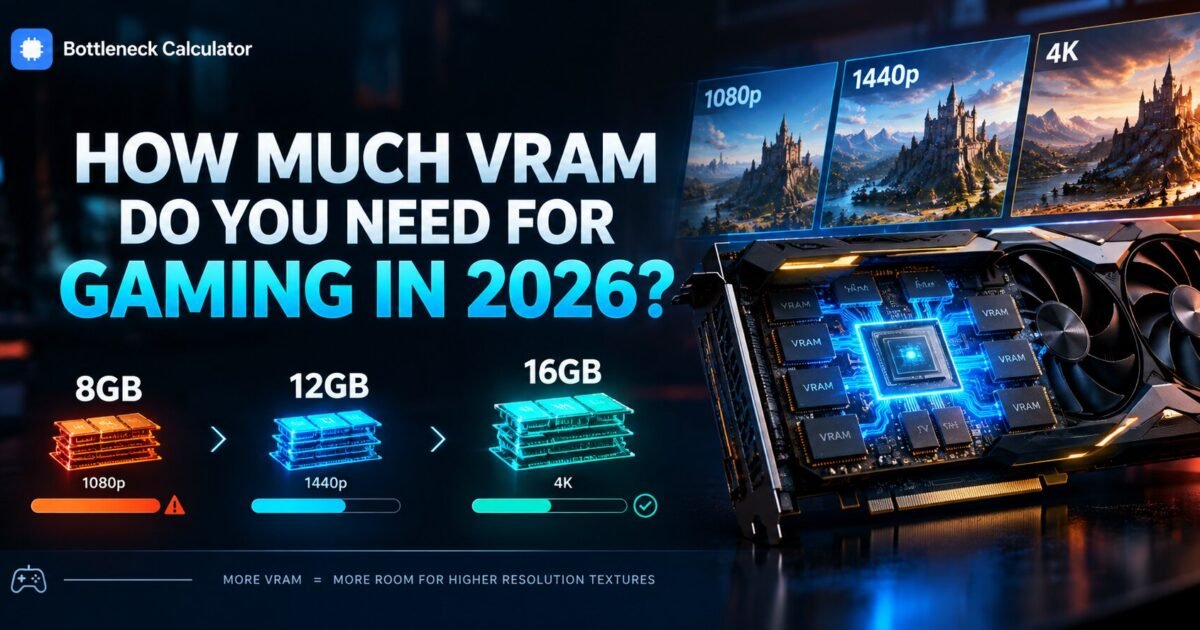
For 1080p gaming 8GB still works but 12GB is comfortable. For 1440p, 12GB is the sensible minimum and 16GB gives you headroom. For 4K with high textures and ray tracing, 16GB is the realistic floor. Buying below these figures means lowering texture quality within two years.
Those numbers assume you want high texture settings, which is the setting most worth keeping. Textures cost memory but cost almost no processing power.
That trade is why running short hurts so much. You end up lowering the one setting that changes how the game looks most while gaining nothing back in speed.
What actually uses video memory?
Textures consume the largest share by far, followed by frame buffers, shadow maps, and ray tracing structures. Resolution affects memory use less than people assume, because textures load at full quality regardless of how many pixels you display them across.
The big consumers, ranked
- Texture quality. Easily the largest single factor, and the first thing to fall back on.
- Ray tracing. Adds 1 to 3GB for the structures that track light bounces.
- Resolution. Real but smaller than expected, mostly through larger buffers.
- Shadow and reflection quality. Moderate, and worth trimming early.
- Frame generation. Holds extra frames in memory, adding several hundred megabytes.
Notice that the top item is also the cheapest to run. Textures are nearly free in processing terms, which is exactly why a memory shortage is so frustrating.
How much VRAM for 1080p, 1440p, and 4K?
Each step up in resolution adds roughly 1 to 2GB of demand, but settings matter more than pixels. A 1080p player running ultra textures and ray tracing can use more memory than a 4K player on medium settings. Plan around your settings, not just your monitor.
| Resolution | Minimum | Comfortable | Future proof | Typical use |
|---|---|---|---|---|
| 1080p medium | 6GB | 8GB | 12GB | 4 to 6GB |
| 1080p high or ultra | 8GB | 12GB | 16GB | 6 to 9GB |
| 1440p high | 8GB | 12GB | 16GB | 7 to 10GB |
| 1440p ultra plus ray tracing | 12GB | 16GB | 16GB | 10 to 13GB |
| 4K high | 12GB | 16GB | 20GB | 10 to 13GB |
| 4K ultra plus ray tracing | 16GB | 16GB | 24GB | 13 to 16GB |
| Setting | Approx VRAM cost | Cut first? |
|---|---|---|
| Texture quality ultra to high | Saves 1 to 2GB | Last resort, biggest visual loss |
| Ray tracing off | Saves 1 to 3GB | Yes, cut first |
| Shadow resolution down one | Saves 0.5 to 1GB | Yes |
| Frame generation off | Saves 0.5GB | Only if desperate |
The fourth row is the one that catches people. A 1440p player who loves ray tracing needs more memory than a 4K player who does not.
What happens when you run out of VRAM?
The card spills data into system memory across the PCIe bus, which is dramatically slower. You get severe stutter, textures that load late or stay blurry, and sudden frame drops lasting a second or more. The average frame rate can still look healthy, which is what makes this so confusing.
Learn the signature. Steady low frames point at a card lacking speed. Fine frames interrupted by violent hitches point at a card lacking memory.
Texture pop in is the other tell. If surfaces stay muddy for a second after you turn a corner, the card is fetching them from somewhere far slower than it should.
This matters when diagnosing performance generally. Our guide to spotting a graphics card limit covers how to tell the two apart in under two minutes.
How do you check your own VRAM usage?
Use an overlay that reports memory actually in use rather than memory allocated. Games routinely reserve far more than they need, so the allocated figure overstates demand. MSI Afterburner with RivaTuner reports both, and the per process figure is the one that matters.
- Install MSI Afterburner and RivaTuner. Both are free.
- Enable the per process memory reading rather than total allocation.
- Play a demanding area for at least fifteen minutes.
- Watch for usage climbing toward your card capacity over time.
- Note whether stutter arrives as usage approaches the limit.
The fifteen minute part is essential. Memory pressure builds as you move through a level, so a quick test in a menu proves nothing.
Is 8GB of VRAM still enough?
For 1080p at medium to high settings, yes for now. For 1440p with high textures, increasingly no. Several recent titles exceed 8GB at 1440p before ray tracing is even switched on, which forces you to lower textures on a card fast enough to handle them.
Here is my blunt view. Buying a new 8GB card in 2026 is a decision you will regret within two years unless you genuinely play at 1080p and plan to stay there.
The frustrating part is that these cards often have plenty of processing power. The memory is the artificial ceiling, and it was a cost decision rather than a technical one.
Does more VRAM make a graphics card faster?
No. Extra capacity prevents a specific failure rather than adding speed. A 16GB card is not quicker than an 8GB version of the same chip in a game that fits inside 8GB. The benefit only appears once you exceed the smaller capacity, and then it is enormous.
Treat capacity as insurance rather than performance. You are buying protection against a cliff, not a smooth upward curve.
Marketing muddies this deliberately. A budget card advertising 16GB paired with a weak processor core is still a slow card, just one that will not stutter on textures.
Check what a card should actually deliver at your resolution with our FPS calculator rather than judging by the memory figure on the box.
How much VRAM does ray tracing need?
Ray tracing adds roughly 1 to 3GB on top of your normal usage. It stores acceleration structures describing the scene geometry so light rays can be traced against it. Path tracing in the most demanding titles can add considerably more than that.
This is why 8GB cards struggle so visibly with ray tracing at 1440p. The feature is the straw that breaks an already loaded camel.
If you want ray tracing at 1440p or above, treat 12GB as your absolute minimum and 16GB as the comfortable answer.
Does DLSS or FSR reduce VRAM usage?
Slightly, because the card renders at a lower internal resolution before upscaling. Expect to save a few hundred megabytes rather than gigabytes. Frame generation works the other way and increases memory use, since it holds additional frames in memory.
Do not count on upscaling to rescue a card that is genuinely short. The saving is real but small, and textures load at full quality regardless of internal resolution.
Upscaling also shifts load back toward your processor, which can expose a different limit entirely. Our explainer on reading a bottleneck percentage covers why that flip catches people out.
How much VRAM will you need in three years?
Expect requirements to rise by roughly 4GB per tier over three years, based on how demands have climbed since 2020. A 12GB card bought today will likely feel like an 8GB card does now. Buying one tier above your current need is the cheapest form of future proofing available.
Console hardware sets the floor for this. Developers target the memory budget consoles offer, and PC requirements track that with a lag.
My prediction is that 16GB becomes the practical mid range standard within two years, and 12GB starts being treated the way 8GB is treated today.
Which settings reclaim the most memory?
Lower texture quality by one step first, since it returns the most memory for the least visual cost at a distance. Then reduce shadow resolution, disable ray tracing, and turn off frame generation. Those four changes typically free 3 to 5GB combined.
Work in that order and stop as soon as the stutter disappears. There is no prize for lowering settings you did not need to lower.
Closing browser windows helps too. Every open tab with video playing holds memory on the same card your game is trying to use.
What do people get wrong about VRAM?
They read allocated memory as required memory, which overstates demand badly. They assume more capacity means more speed, which it does not. And they judge cards on the memory figure alone while ignoring the processing power behind it.
The allocation confusion causes the most wasted money. A game reserving 11GB on a 12GB card may genuinely need only 7GB, and panicking at that number leads to unnecessary upgrades.
The third mistake runs the other way. Budget cards advertising large memory figures attract buyers who then discover the card lacks the power to use it.
Price a balanced build in our PC builder and confirm your power headroom with the power supply calculator before ordering any card.
Do integrated graphics use VRAM?
Integrated graphics have no dedicated memory at all. They borrow from your system memory instead, which is far slower than the memory soldered onto a discrete card. That is the main reason integrated graphics lag behind even modest dedicated cards in games.
You can usually adjust how much memory the BIOS reserves for graphics. Raising it helps a little on integrated systems, but it takes that capacity away from everything else.
Dual channel matters enormously here. An integrated system running a single memory stick loses roughly half its graphics bandwidth, which hurts far more than it would on a machine with a dedicated card.
If you game on integrated graphics, fitting a second matching stick is the cheapest meaningful upgrade available to you.
Which cards give the most VRAM per dollar?
AMD cards have consistently offered more memory at each price point than their direct competitors, often by 4GB at the same money. Nvidia cards counter with stronger ray tracing and more mature upscaling. Which matters more depends entirely on the settings you actually use.
My honest read is that memory capacity ages better than feature sets. Upscaling keeps improving across both brands, while a card short on memory stays short forever.
Compare the capacity figure against the price before you compare anything else at the mid range. Above that tier both brands offer enough that the decision shifts to features.
Check the pairing against your processor too, since a card held back by an old chip wastes whatever memory it carries. Our guide to pairing a processor and a card covers what actually has to match.
Frequently asked questions
How much VRAM do I need for gaming?
For 1080p, 8GB works and 12GB is comfortable. For 1440p, treat 12GB as the minimum and 16GB as comfortable. For 4K with high textures and ray tracing, 16GB is the realistic floor. Buying below these figures means lowering textures within about two years.
Is 8GB of VRAM enough in 2026?
At 1080p with medium to high settings, yes for now. At 1440p with high textures, increasingly not. Several recent titles pass 8GB at 1440p before ray tracing is enabled, which forces texture reductions on cards that are otherwise fast enough.
Does more VRAM increase FPS?
No. Extra capacity prevents stutter rather than adding speed. A 16GB card is not faster than an 8GB version of the same chip in a game that fits in 8GB. The benefit only appears once you exceed the smaller capacity, and then it is dramatic.
What happens when VRAM is full?
The card spills data into system memory over the PCIe bus, which is far slower. You get severe stutter, late loading or blurry textures, and frame drops lasting a second. Your average frame rate can still look fine, which makes it easy to misdiagnose.
How do I check how much VRAM I am using?
Use MSI Afterburner with RivaTuner and enable the per process memory reading rather than total allocation. Games reserve far more than they need, so allocation overstates demand. Play a demanding area for fifteen minutes before judging the figure.
How much VRAM does 4K gaming need?
Plan for 12GB at high settings and 16GB if you want ultra textures with ray tracing. Resolution matters less than settings, so a 1440p player using ultra textures and ray tracing can consume more memory than a 4K player running medium.
Does ray tracing use more VRAM?
Yes, roughly 1 to 3GB on top of normal usage for the structures that describe scene geometry. Path tracing costs considerably more. This is why 8GB cards struggle so visibly with ray tracing at 1440p and above.
Does DLSS reduce VRAM usage?
Slightly, since the card renders at a lower internal resolution first. Expect to save a few hundred megabytes rather than gigabytes. Frame generation increases usage instead, because it holds extra frames in memory while it works.
Can you upgrade VRAM on a graphics card?
No. Video memory is soldered to the board and fixed at manufacture. The only way to get more is a different card, which is exactly why the capacity you choose at purchase matters so much for how long the card stays usable.
Is 12GB of VRAM enough for 1440p?
Yes, comfortably today and probably for another two to three years. It handles high textures and moderate ray tracing without trouble. If you want ultra textures with heavy ray tracing and plan to keep the card a long while, 16GB is the safer choice.
Does VRAM usage differ between AMD and NVIDIA?
Slightly. AMD cards often report higher allocation for the same workload because of how drivers reserve memory, but actual requirements are broadly comparable. Judge by in game behaviour rather than the reported figure.
Do texture mods increase VRAM use?
Substantially. High resolution texture packs are among the heaviest memory consumers available, frequently adding several gigabytes. Check your headroom before installing them on an 8GB card.
Does running two monitors use more VRAM?
A little, usually a few hundred megabytes for the additional frame buffer. Video playback or a browser on the second screen costs more than the display itself does.
Where this leaves you
Remember those textures turning to mud ten minutes in? That card was never slow. It simply had nowhere left to put the data.
So treat capacity as the specification that decides how long a card stays pleasant to own. Processing power decides how fast it is today. Memory decides whether you still like it in three years.
If you are buying now, 12GB is the floor and 16GB is the comfortable answer for anything above 1080p. I would take 16GB on a slightly slower card over 8GB on a faster one without hesitating.
Your next step takes fifteen minutes. Run an overlay in your most demanding game and watch whether usage creeps toward your limit as you play.
How much memory does your card hold, and have you seen those hitches yet?
Related reading

Hardware-Accelerated GPU Scheduling: On or Off in 2026?
A Reddit thread tells you to turn it on. The next reply says it tanked their frame rate. A YouTube comment swears it fixed their stutter. Someone else…
Read more about Hardware-Accelerated GPU Scheduling: On or Off in 2026?
What Is a GPU Bottleneck? How to Spot One in Two Minutes
You save for four months. The RTX 4070 arrives, you drop it in, and you launch Cyberpunk at 1440p expecting a transformation. You gain eleven frames. Eleven. Your…
Read more about What Is a GPU Bottleneck? How to Spot One in Two Minutes